Bookings · deposits · one system for the whole shop

Run your tattoo studio
without the chaos.

Bookings, deposits, client records, artist schedules, and studio operations—all in one system built for tattoo shops, not generic appointment businesses.

See how it worksSee pricing

Built for modern tattoo studios, from solo artists to growing multi-location brands. Cloud-hosted; teams in the U.S. and overseas run on the same stack.

Replace studio chaos with operational clarity. Built for owners, managers, and artists—not a salon tool with a tattoo sticker.

01

Built for tattoo studios, not generic booking businesses

Long consults, reschedules, and multi-session work stay in one place—so you are not forcing a tattoo workflow into software built for a different business.

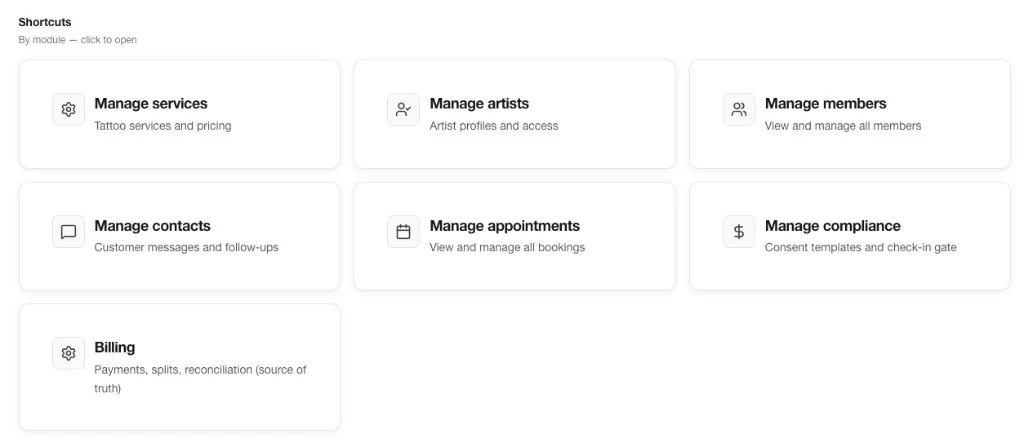
Admin Shortcuts: quick links to services, artists, members, contacts, appointments, compliance, and billing.

02

Designed for owners, managers, and artists

Front desk and artists share one calendar and one client record. Fewer “let me check with the artist” callbacks, fewer arguments about who is actually booked.

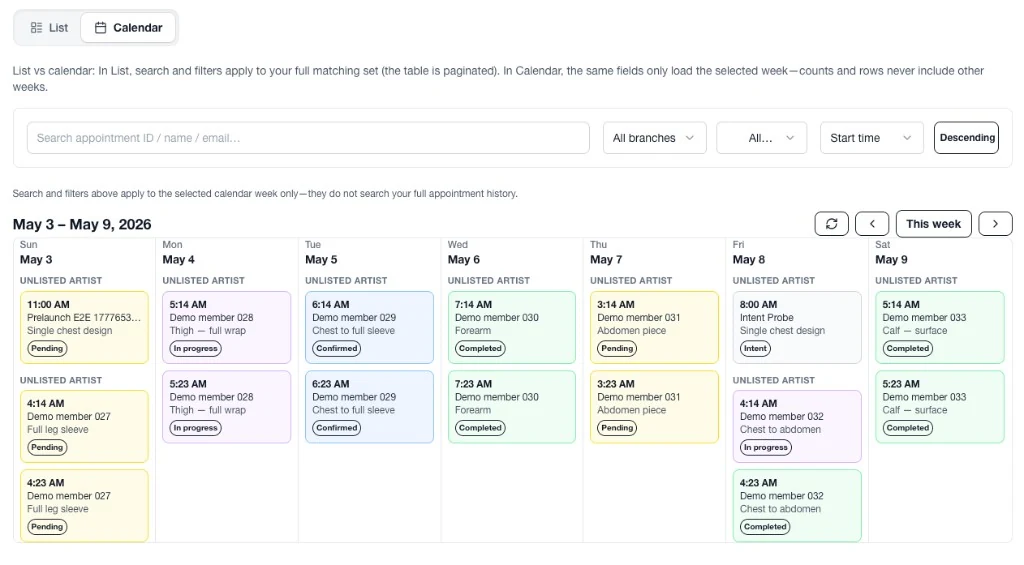
Admin appointments calendar: weekly view with list vs calendar, filters, and status-coded booking cards.

03

Single shop today, room to grow tomorrow

Start lean with one location. When you are ready, expand without rebuilding your operations from scratch—deposits and balances stay tied to the appointment, not a spreadsheet.

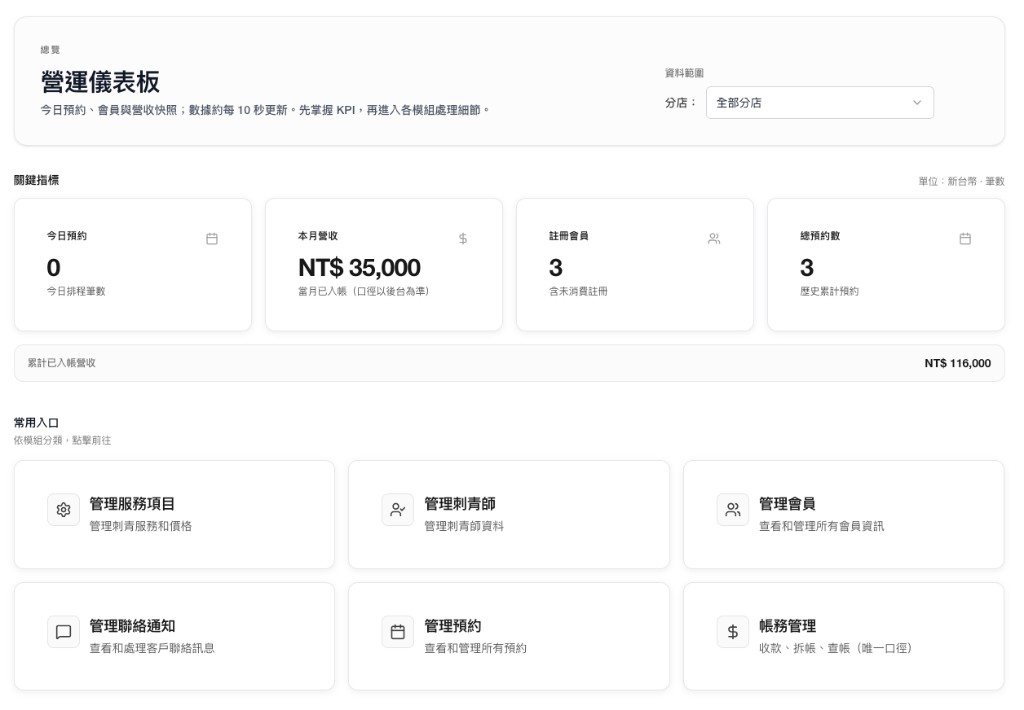
1.0 Operations dashboard

One system for the way tattoo studios actually run

Tattoo | MusederLabs gives you one place to see how the day is really going: today’s appointments, revenue month-to-date, members on file, and lifetime revenue—with one-tap jumps to bookings, contacts, and billing.

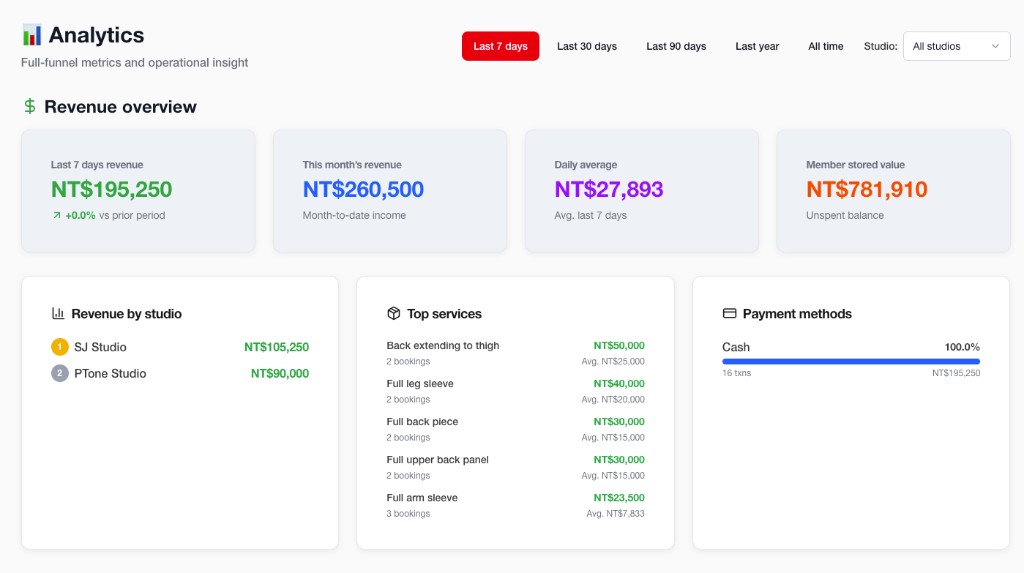
Admin analytics: revenue overview, studio leaderboard, top services, and payment methods
Revenue and studio performance at a glance—the snapshot owners open before and after the shift.

2.0 Roadmap

From consult to wrap—on a timeline

Manage the full client journey in one system: cover-ups, big pieces, and multi-session projects read cleaner on a timeline than a day grid alone—less context lost between sessions.

3.0 Client record

Client information where your team actually needs it

See booking history, preferences, and consult notes in one profile—so touch-ups and artist handoffs do not reset the story. Stable facts on the left, time-stamped notes on the right.

4.0 Reports

Revenue and members across any date range

Turn studio operations into a cleaner story: last 7 / 30 / 90 days or a custom window—branch leaderboard, top services, how people pay, and member activity—so owners are not piecing the month together from DMs and side files.

Last 7 days

1 / 2

Analytics reports carousel: switch between last 7 days and last 30 days revenue overviewSame Reports view—use the arrows or dots (or wait for the slide) to compare a short window with a longer range.

Pricing

Start with a free trial. Upgrade when it fits your studio.

End-to-end workflow on every tier—same app, same free trial. Starter is a full single shop; Pro adds scale and owner reporting; Enterprise adds brands, domains, and procurement. USD per month. Annual, add-ons, and custom scope are set at signup—ask for a quote when you need it.

Annual billing usually saves ~20%

Starter

A complete single-location system—not a “lite” trial

Was $83, now $49/mo.

  • Guest booking + one live shop calendar the whole team sees
  • One shareable guest link—fewer “DM to book” loops
  • Owner, desk, and artist roles with clear permissions
  • One client file: consult notes, preferences, allergies, deposits, visit and session history
  • Same-day context: last artist, agreed work, what still needs follow-up
  • Deposits and visit money where the team can see it—not a private sheet
  • Email and in-app updates so handoffs are not only in personal texts
  • Community and email support from day one
Start free trial
Where most shops start

Pro

When you add locations, artists, and need the owner’s view

Was $180, now $99/mo.

  • All of Starter, scaled to more artists, stations, and locations
  • One schedule across artists, stations, and multiple shop addresses
  • Branch roll-up: volume, load, and activity by site or team—no spreadsheet rescue
  • Owner and studio reports: revenue, services, payments, members, and team activity (7 / 30 / 90 days or custom)
  • Owner view: what’s working, what’s backlogged, floor vs. books
  • Tighter in-product and email cadence for a busier operation
  • Priority support and scheduled office hours
Start free trial

Enterprise

Brands, procurement, and a guided rollout

Was $250, now $149/mo.

  • All of Pro, plus what multi-brand and enterprise buyers need on paper
  • Extra branded guest domains for sub-brands, partners, or regions
  • MSAs, billing, and terms that work for legal, finance, and the parent org
  • Named implementation and success contact—kickoff through steady state
  • Security, privacy, and document review for IT and compliance
  • Scoping before go-live: data, training, and success criteria
Start free trial

What’s included

Same app, same free trial, real workflow in every column. Starter = one full shop. Pro = scale + owner view. Enterprise = extra domains, contracts, and a guided launch.

Compare Starter, Pro, and Enterprise for US tattoo studios

Starter

Full workflow for one shop

  • Online guest booking & self-serve times
  • Shared shop calendar the whole team uses
  • Primary guest link & consistent client flow
  • Team roles, client records, deposits & visit history
  • Consult & session notes; handoff-ready client context
  • Email & in-app client and team updates
  • Community & email support
  • Multi-artist, multi-station, multi-location
  • Branch roll-up & cross-location visibility
  • Owner & studio performance reports
  • Priority support & office hours
  • Extra branded client domains
  • MSA, custom billing & implementation contact

Pro

Multi-site + owner insights

  • Online guest booking & self-serve times
  • Shared shop calendar the whole team uses
  • Primary guest link & consistent client flow
  • Team roles, client records, deposits & visit history
  • Consult & session notes; handoff-ready client context
  • Email & in-app client and team updates
  • Community & email support
  • Multi-artist, multi-station, multi-location
  • Branch roll-up & cross-location visibility
  • Owner & studio performance reports
  • Priority support & office hours
  • Extra branded client domains
  • MSA, custom billing & implementation contact

Enterprise

Brands, domains & procurement

  • Online guest booking & self-serve times
  • Shared shop calendar the whole team uses
  • Primary guest link & consistent client flow
  • Team roles, client records, deposits & visit history
  • Consult & session notes; handoff-ready client context
  • Email & in-app client and team updates
  • Community & email support
  • Multi-artist, multi-station, multi-location
  • Branch roll-up & cross-location visibility
  • Owner & studio performance reports
  • Priority support & office hours
  • Extra branded client domains
  • MSA, custom billing & implementation contact

Too many tools. Too many missed details. Too much studio chaos.

If your week still runs on DMs, calendars, notes, and spreadsheets, you are not alone.

Most tattoo studios are still stitching operations together with DMs, calendars, notes, spreadsheets, and payment workarounds. It works, until it does not.

Appointments get messy. Deposits get chased manually. Client history lives in the wrong place. Artists ask for updates in chat. Owners end up fixing the same operational problems every week.

“Who did I book with last time?” should not require scrolling texts to piece the thread back together.

When someone calls in sick, front desk should not remember the schedule differently than the owner.

At month close, your deposit story should not live in three browser tabs, a group chat, and a spreadsheet rescue mission at midnight.

That is not growth. That is just organized stress.

For studios already on “something else”

Already using another system, but still fighting it?

A lot of studios are not choosing between “software” and “no software.” They are choosing between software they tolerate and software that actually fits how their shop runs.

If your current setup feels outdated, clunky, or full of workarounds, the real cost is not just annoyance. It is slower admin, messier handoffs, more manual follow-up, and a team that slowly stops trusting the system.

You do not need a full operational overhaul on day one. Start your free trial, run a real part of your workflow, and see if the shop breathes easier.

  • Try it with your current workflow
  • See if your team actually prefers using it
  • Test before you commit to a bigger switch

Start simple. Run cleaner. Grow from there.

Same playbook from the first message to a second location—bigger footprint, not bigger chaos.

  1. 1

    Set up your studio. Add your artists, services, locations, and core settings.

  2. 2

    Run your booking and payment flow. Appointments, deposits, and client records live in one admin, not a pile of side channels.

  3. 3

    Layer in the rest of the shop as the team gets comfortable. Expand locations or branded guest URLs when you are ready—reuse the workflow, not the fire drills.

Common questions

Is this built for tattoo studios or generic salons?

Tattoo | MusederLabs is tattoo studio management software: artist scheduling, client records, bookings, deposits, and shop operations—so you are not bending a one-size appointment business tool into a tattoo workflow.

What if I already use another system?

You do not need to switch everything at once. Start with a free trial, run part of your workflow, and only expand once it clearly fits better than what you are tolerating today.

Will my artists actually use it?

The point is not more software to fight. The point is a cleaner daily flow—fewer back-and-forth messages, fewer missed handoffs, and a calendar everyone can trust.

Is this only for large studios?

No. It is built for solo artists and single-location shops, with room to grow into multi-artist, multi-location operations when you are ready.

Can I use it if a lot of our process is still manual?

Yes. Most shops do not start “perfect.” If your process is still partly manual, a cleaner system is how you grow out of the chaos without pretending you are already there.

From the field

Studios already live on Tattoo | MusederLabs

“Month close used to be three browser tabs and a prayer. At least bookings and balances finally match.”

Studio admin · U.S. · anonymous

“Clients grab slots without blowing up my phone—who’s free is obvious in admin.”

Shop manager · Austin, TX

“Adding another artist used to mean double-booking drama. One board cut the arguments way down.”

Studio owner · Brooklyn, NY

23+ tenant studios · U.S. and international · cloud-hosted

How new clients find you

Most new business is Google Search and Maps. Keep your marketing site and your admin on different URLs so your brand story stays clear—we ship solid structure and SEO hygiene out of the box.

Your studio does not need more tools. It needs one system that fits.

If your bookings, deposits, client details, and artist schedules are still spread across too many places, this is your chance to clean it up without overcomplicating your day-to-day flow.

Keep your marketing site and your booking link on different URLs so your brand story stays clear—and guests are not guessing which login screen they landed on.

Tattoo | MusederLabs — All-in-one operations for modern tattoo studios